CANcorder
CAN bus logger and analyzer for automotive diagnostics
Capture live CAN traffic, reassemble ISO-TP messages, and decode UDS, OBD-II, KWP2000, J1939, CCP, and XCP in real time. Cross-platform. No subscription.
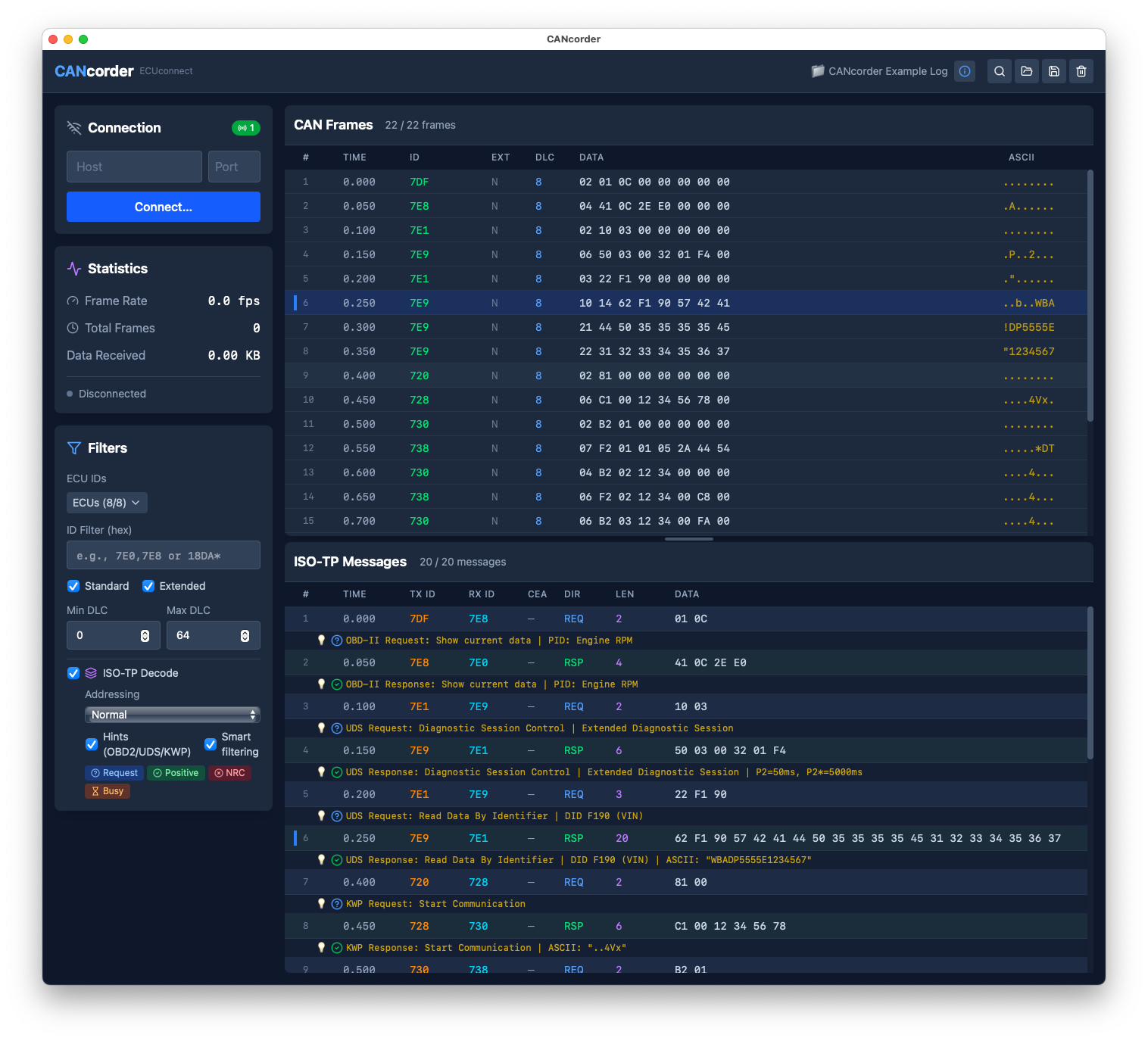
Enterprise CAN tools come with steep learning curves and four-figure price tags. Open-source alternatives cover the basics but often lack protocol decoding or offline analysis. CANcorder bridges that gap: professional features, approachable UI, one-time purchase.
Live Capture
Connect to CAN hardware and watch frames arrive in real time. Pause, filter, search — all without missing a beat.
ISO-TP Reassembly
Multi-frame messages are automatically reassembled and correlated. Seven transport protocols: ISO-TP, ISO-TP (CEA), SAE TP2.0, K-Line TP, J1939, CCP, and XCP.
Protocol Hints
Instant human-readable decoding for UDS, OBD-II, and KWP2000 — service names, PIDs, DIDs, NRCs, and more at a glance.
Plugin System
Extend decoding with JSON-based plugins for vendor-specific or proprietary protocols. No code compilation needed.
Frame Sending
Send individual frames, repeat sequences, sweep ID ranges, or run custom lists — directly from the UI with rate control.
Hex Search
Search for byte patterns across all captured frames and messages. Navigate matches with keyboard shortcuts.
CANcorder's dual-pane layout shows CAN frames and reassembled messages side-by-side. Click a message to highlight its constituent frames — and vice versa.
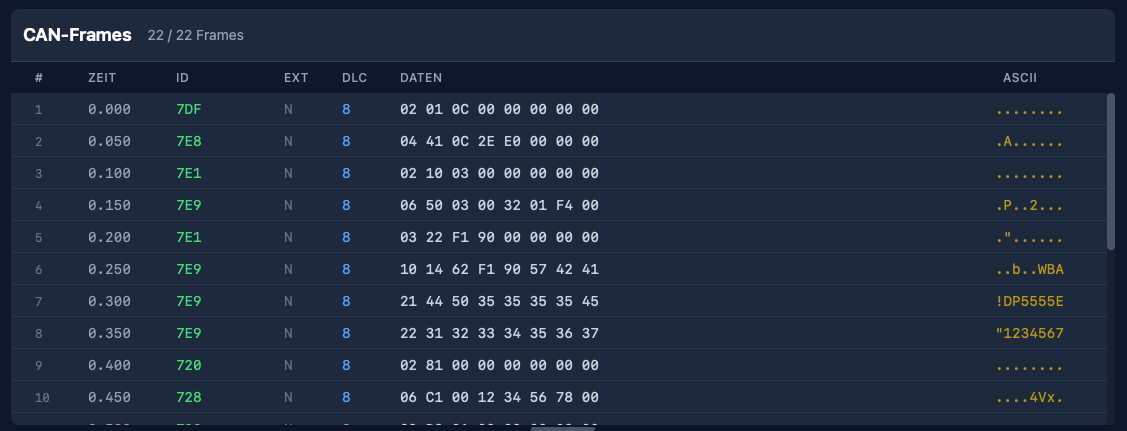
Live CAN Frame Capture
Connect to your CAN interface and see every frame as it arrives. Virtualized rendering handles tens of thousands of frames without lag.
- Standard (11-bit) and extended (29-bit) arbitration IDs
- CAN FD support with configurable bitrates
- Filter by ID (exact, wildcard, or regex)
- DLC range filtering and frame type toggles
- Click to copy frame data to clipboard
- Shift-click to measure time deltas between frames
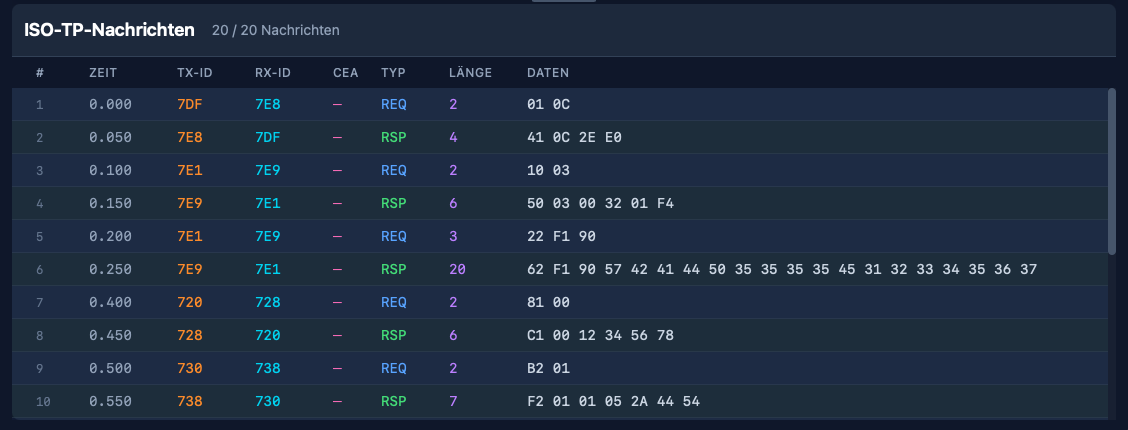
Multi-Protocol Message Reassembly
Fragmented multi-frame messages are automatically reassembled and displayed with timing information and direction detection — across seven transport protocols.
- ISO-TP with conventional and extended addressing
- SAE TP2.0 (Volkswagen Group) with dynamic channels
- K-Line transport for serial diagnostics
- J1939 transport (BAM broadcast and RTS/CTS with flow control)
- CCP and XCP calibration protocol decoding
- Bidirectional frame correlation (click to highlight)
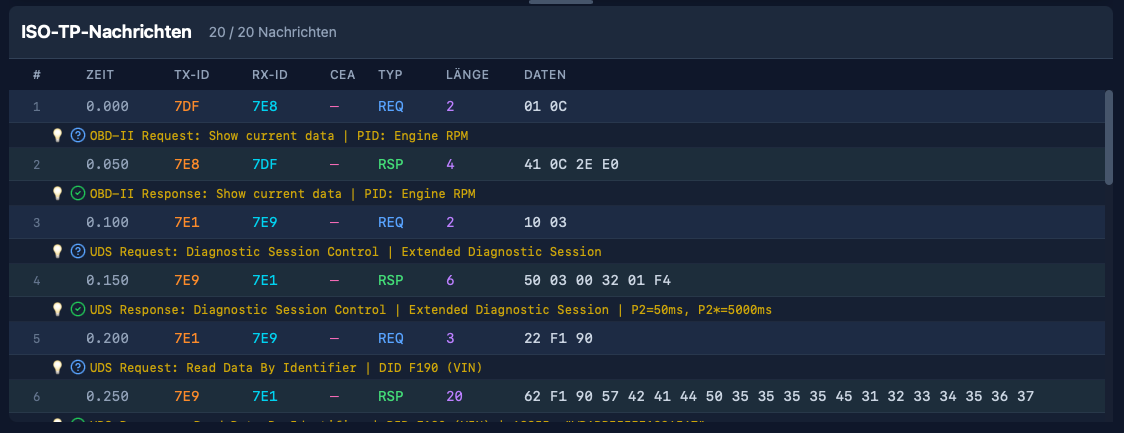
Protocol Hints
CANcorder recognizes diagnostic messages and overlays human-readable annotations. Expand any hint to see field names, interpreted values, and raw bytes.
- UDS: 12+ services with DID lookup (VIN, ECU serial, firmware…)
- OBD-II: all modes with PID interpretation (RPM, speed, temp…)
- KWP2000: legacy protocol with best-effort matching
- Color-coded status: request, positive, NRC, busy
- Smart filtering: show only request/response pairs per ECU
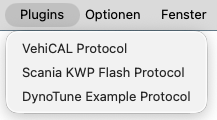
Extensible Plugin System
When standard protocols aren't enough, create JSON-based plugins to decode your own vendor-specific services. No compilation needed — just drop a file.
- JSON plugin format with schema validation
- Carrier service wrapping for tunnelled protocols
- Conversation tracking for stateful decoding
- Field formats: hex, decimal, ASCII, version, address
- Built-in example: VehiCAL calibration protocol
CANcorder isn't just a passive logger. Send individual frames, automated sequences, or sweep entire ID ranges — ideal for diagnostics, fuzzing, and ECU development.
Single Frame
Manual ID and data entry with standard/extended toggle. Send history tracks the last 20 entries for quick resend.
Repeat Mode
Send the same frame N times at a configurable rate. Perfect for stress testing and keepalive simulation.
ID Sweep
Iterate through an ID range with fixed payload and configurable step size. Discover which arbitration IDs are active.
Custom Sequence
Define multi-frame sequences with one frame per line. Optional looping with FPS or interval rate control.
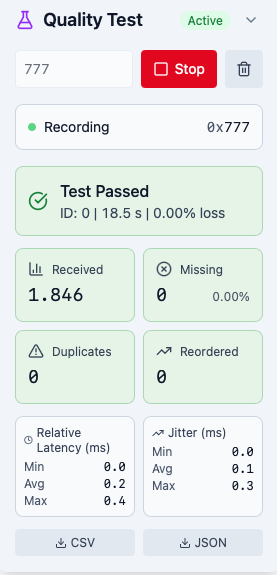
Quality Test Panel
Measure the reliability of your CAN link in real time. CANcorder tracks a custom test protocol and reports detailed quality metrics — ideal for validating adapters, cables, and bus configurations before a diagnostic session.
- Packet loss, duplicates, and out-of-order detection
- Latency and jitter analysis (min / avg / max)
- Checksum verification and burst loss reporting
- Pass / fail verdict with color-coded status
- Export results as CSV or JSON
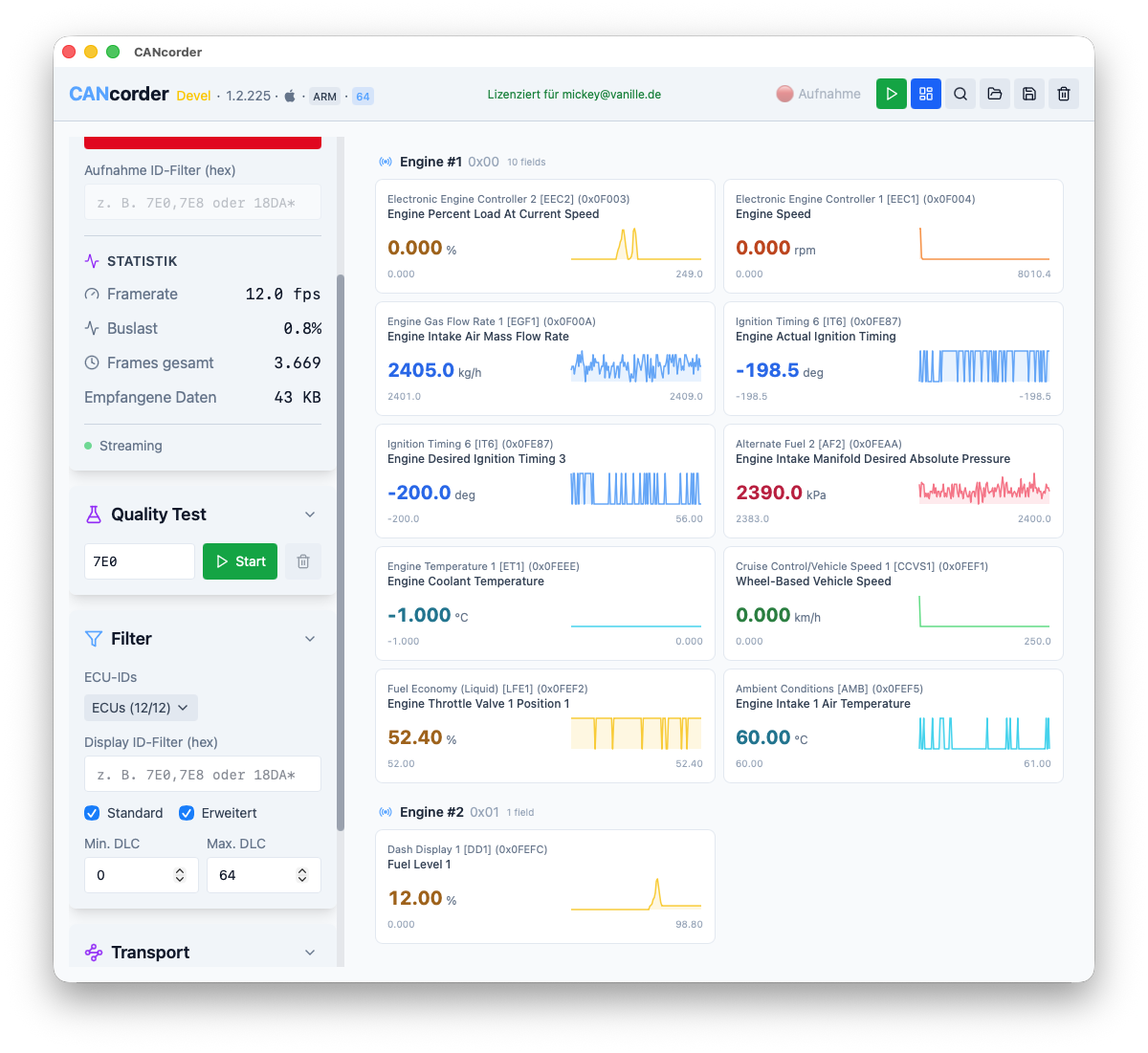
J1939 Live Dashboard
Monitor decoded J1939 parameters in real time. The dashboard decodes PGN payloads into human-readable values and tracks their history with sparkline charts — grouped by source ECU.
- Engine speed, temperatures, pressures, voltages at a glance
- 120-sample sparkline history per field
- Automatic field discovery — only changing values shown
- Color-coded units (RPM, km/h, °C, %, V, kPa)
- Extensible via external J1939db.json catalog
Rare among modern tools — CANcorder handles K-Line (ISO 9141 / ISO 14230) diagnostics via J2534 adapters on Windows. Session init, keepalive, and raw byte capture alongside CAN.
Drag and drop log files from any source. CANcorder auto-detects the format and displays rich metadata including VIN, logger info, and capture timing.
Native drivers on every platform — no generic middleware, no compatibility headaches.
macOS
Native USB drivers for popular CAN adapters. No kernel extensions.
gs_usb (CANable, candleLight, Innomaker…)
Tactrix OpenPort 2.0
Rusoku TouCAN
TCP / Zeroconf discovery
Windows
J2534 PassThru with out-of-process bridge. Supports both 32-bit and 64-bit adapter DLLs.
CAN and K-Line protocols
32-bit DLL bridge (no separate build)
TCP / Zeroconf discovery
Linux
Direct SocketCAN integration. Works with any interface the kernel can see.
Classic CAN and CAN FD
TCP / Zeroconf discovery
AppImage, .deb, .rpm
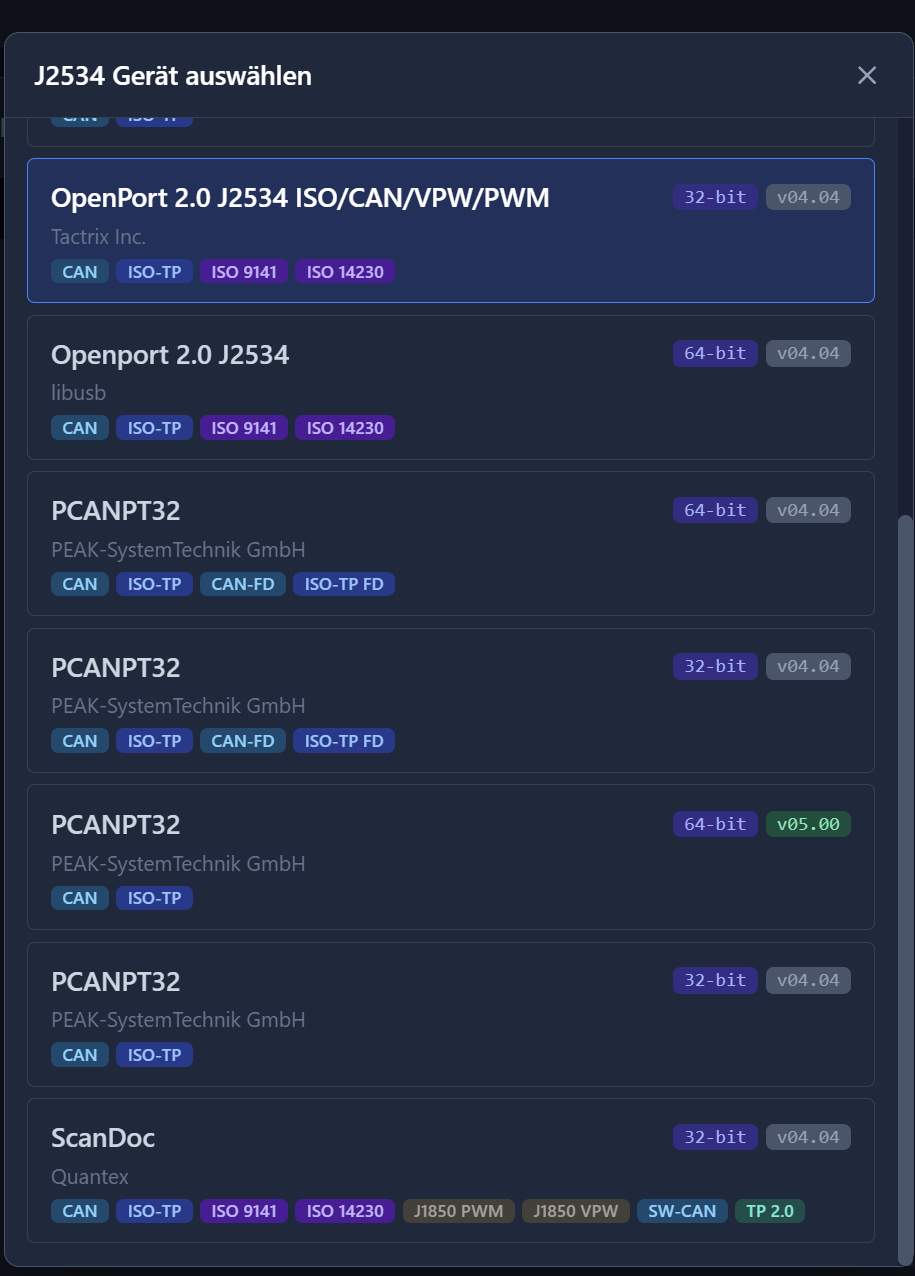
Unique J2534 Bridge Architecture
CANcorder ships as a 64-bit app with a bundled 32-bit bridge process. Legacy 32-bit J2534 DLLs run in an isolated process with IPC, so a misbehaving driver cannot take down the main application.
- Auto-detection of installed J2534 adapters
- 32-bit and 64-bit DLLs supported simultaneously
- Out-of-process isolation for stability
A representative overview of how different tool categories typically compare. Capabilities vary by product edition and configuration.
| Capability | CANcorder | Enterprise Suites | Mid-Range | Open-Source |
|---|---|---|---|---|
| Live CAN capture | Yes | |||
| ISO-TP reassembly | 7 transport layers | Varies | Varies | |
| UDS / OBD-II / KWP decoding | Built-in | Signal-level typical | Varies | |
| PCAPNG with DoIP / HSFZ | Yes | Ethernet-level typical | Uncommon | Uncommon |
| SAE TP2.0 (VAG) | Yes | Rare | Uncommon | Uncommon |
| J1939 transport | BAM + RTS/CTS + Dashboard | Varies | Varies | |
| CCP / XCP calibration | Cmd decode + pairing | Varies | Uncommon | |
| K-Line support | Via J2534 | Uncommon | Uncommon | |
| Extensibility | JSON plugins | Scripting / APIs | Add-ins typical | Source access |
| Frame sending | Send + sweep + seq | |||
| Link quality testing | Loss, jitter, latency | Vendor-specific | Uncommon | Uncommon |
| CAN FD | Yes | Varies | ||
| Log import | CL1000, candump, ECUconnect, PCAPNG | Proprietary + standard | Proprietary formats | Community formats |
| Cross-platform | macOS, Win, Linux | Windows typical | Windows typical | |
| Licensing | Offline key, one-time | Annual / per-seat | Per-seat + hardware | Free / OSS |
| Typical price | €79 one-time | Thousands / year | Hundreds | Free |
Try CANcorder free for 10 days
Version 1.2.293
The final amount is shown in Lemon Squeezy checkout before payment, including applicable tax. Review the Terms of Sale, the App Privacy Policy, and the Legal Notice before purchase.
macOS
Download the ZIP, extract, and drag CANcorder.app to Applications. On first launch, right-click and select “Open” to bypass Gatekeeper.
Windows
Run the installer. Installs per-user (no admin required). Both 32-bit and 64-bit J2534 bridge executables are bundled automatically.
Linux: AppImage, .deb, and .rpm packages available on request.
Questions, feature requests, or bug reports? See the Legal Notice for contact details.